
My Cooking: Restaurant Game
gameoneArcade
4.75.21K Reviews
- Version
- 11.2.23.5086
- Installs
- 50.00M
- Age Rating
- Everyone
Screenshots
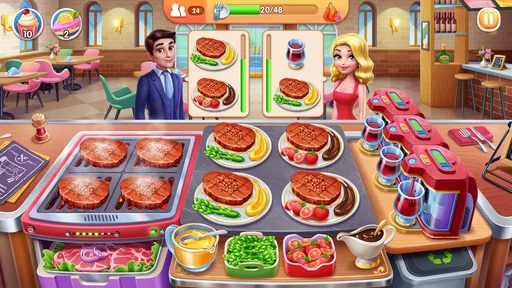
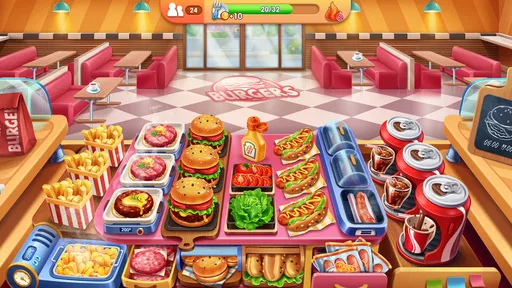
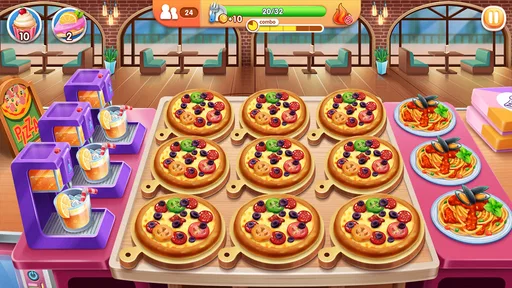
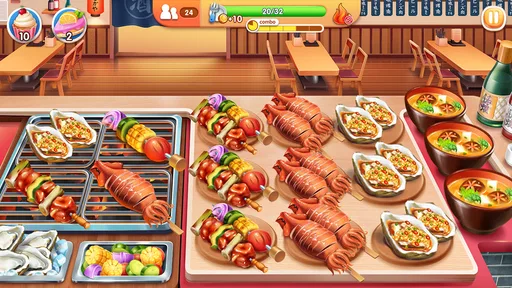

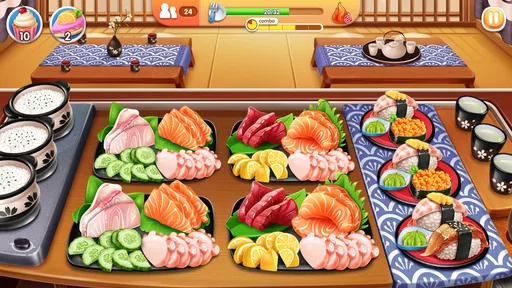
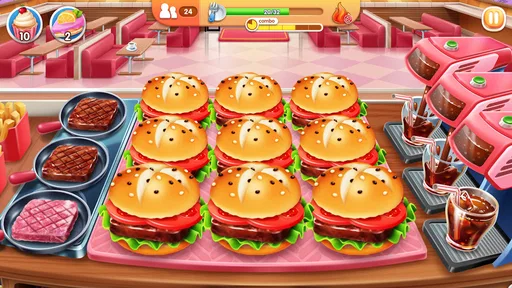

Our Review of My Cooking: Restaurant Game
 Analysis by Appyee
I tend to enjoy cooking games most when the challenge comes from keeping several orders moving, rather than simply tapping through a recipe. My Cooking: Restaurant Game is built around that kind of kitchen pressure: you prepare food, keep an eye on waiting customers and try to serve before a dish or an order goes wrong. It is easy to understand, but the pace gives each round a little urgency.
That focus makes it a handy choice for a short break when I want something more active than a simple match game. It is not a realistic cooking simulator, and I would not pick it for slow, thoughtful play. The appeal is the quick decision-making: what needs attention now, what can wait a moment, and whether a kitchen improvement is worth working toward.
First Impressions and Gameplay
Right off the bat, My Cooking: Restaurant Game pulls you in with its vibrant graphics and easy-to-navigate interface. The colors are vivid, almost like flipping through the pages of a beautifully illustrated cookbook. You’ll find yourself drooling over the pixelated dishes that look surprisingly appetizing!
The game kicks off with a simple tutorial that gets you up to speed with the basics. You start off as a rookie chef in a modest kitchen, whipping up simple dishes like burgers and fries. But don’t let the ease of early levels fool you; it quickly ramps up, testing your multitasking skills as you juggle multiple orders, ingredients, and even some picky customers.
That early learning curve is useful because it lets you get comfortable with the tap controls before the kitchen asks you to make quicker choices. I find it helps to treat each level as a small workflow problem, not just a race. Notice which actions can be prepared while another item cooks, then decide what to serve first based on the orders in front of you. This habit makes the rush feel more manageable and gives you a clearer sense of why a round went well or fell apart.
Cooking Mechanics
The mechanics are pretty straightforward but addictive. You tap to prepare ingredients, cook, and serve dishes to waiting customers. Timing is everything here. The faster you serve, the happier your customers, and the bigger your tips. But beware, let a dish overcook or an order sit too long, and you’ll have one grumpy diner on your hands!
One thing I really appreciate is how intuitive the controls are. It’s a tap-and-go system that makes the gameplay smooth and enjoyable, even when things start heating up in the kitchen.
The useful skill is learning not to react to every new order in isolation. When several customers are waiting, I first scan the full queue, then prioritize anything already cooking or close to being ready. That quick glance can prevent the common mistake of starting another task while a finished dish is being neglected. It is a small adjustment, but it makes the game feel more like managing a busy counter than mindlessly tapping as fast as possible.
Because the controls are touch-based, the game is easy to pick up without a long warm-up. The trade-off is that a crowded round can feel hectic on a phone screen, especially if you prefer games that leave time to plan each move. I would play with enough attention to see the orders clearly rather than trying to squeeze in a level while distracted by something else.
Levels and Challenges
As you advance, you unlock new restaurants, each with its own unique menu and challenges. From sushi bars to Italian bistros, each level offers something fresh and exciting. The variety keeps things interesting, and there’s always a new dish to master or a new kitchen gadget to unlock.
The game also throws in some curveballs with timed levels and special challenges that test your speed and efficiency. It’s like a fun little stress test for your brain, but in a good way!
The changing menus matter because a routine that works in one kitchen may not carry neatly into another. When a restaurant introduces unfamiliar dishes, I slow down enough to learn the sequence before chasing a perfect run. Once the pattern becomes familiar, I can focus on order priority again. This makes progression feel more rewarding than simply repeating the same burger-and-fries routine, though players who want one consistent set of rules may find the changes less relaxing.
For a practical session, I would choose a level that matches the time and attention I have available. A familiar stage is a better fit when I only want a quick, low-stakes round; a new restaurant or timed challenge suits a moment when I can concentrate. That distinction helps keep the harder levels entertaining instead of turning every session into a test of reflexes.
Upgrades and Customization
Now, let’s talk upgrades. As you progress, you earn coins and gems, which you can use to upgrade your kitchen and equipment. Better gear means faster cooking times and higher scores. Plus, who doesn’t want a shiny new oven or a snazzy countertop?
You can also customize your chef avatar, adding a personal touch to your culinary journey. It’s a small feature, but it adds a bit of personality and ownership to the game, which I find pretty charming.
My advice is to think about upgrades as a way to smooth out the bottleneck you actually notice, rather than spending resources just because an item is available. If a round regularly goes wrong while food is waiting, equipment that helps the cooking flow is more useful than a cosmetic change. The avatar options are there for enjoyment and identity, but they do not replace the practical value of improving the kitchen when a particular stage is giving you trouble.
This is also where patience can make the free-to-play structure feel less frustrating. I would avoid treating every difficult level as a reason to buy something immediately. First, try adjusting your order sequence and replaying with a clearer plan. If the challenge is still enjoyable, keep progressing at your own pace; if repeating it feels like a chore, that is a good sign the game may not be the right fit for you.
In-Game Purchases
Of course, with most free-to-play games, there are in-game purchases. While you can definitely enjoy the game without spending a dime, those who want to speed up their progress or unlock special items might be tempted to make a purchase. The game strikes a decent balance, though, and doesn’t feel too pushy about it.
The game is free to download, with optional in-app purchases priced from $0.49 to $99.99 per item. I would keep that range in mind if a child is playing, since the game is rated Everyone and its quick rounds can be appealing to younger players. The age rating makes it broadly accessible, but it does not mean spending choices should be left unexplained. A sensible approach is to decide beforehand whether purchases are off the table or whether any spending needs an adult’s approval.
For an adult deciding whether to pay, the key question is whether the purchase would remove a genuine annoyance or simply shorten the progression that makes the game satisfying. I would try the free experience first and only consider spending after seeing how often I return to it. The gameone-developed arcade title has a 4.7 average from around 417,000 ratings, with over 50 million installs; that popularity suggests it has found a broad audience, but it cannot tell you whether its quick, demanding rhythm suits your own taste.
Graphics and Sound
I’ve got to give props to the developers for the game’s aesthetics. The graphics are bright and cheerful, giving off a warm, inviting vibe. It’s a feast for the eyes, with each restaurant offering a distinct atmosphere that complements its cuisine.
The sound design is equally commendable. The background music is upbeat and perfectly matches the hustle and bustle of a busy kitchen. The sound effects, from the sizzle of a grill to the ding of a ready order, add an immersive layer to the experience.
The bright presentation makes the pressure feel playful rather than harsh, which is one reason I can imagine returning for a few rounds after a long day. Still, sound and animation are supporting details, not the main attraction. If you usually play with audio off, the visual cues and familiar order patterns matter more; if you enjoy audible feedback, the kitchen sounds help each completed task feel clear and satisfying.
Where It Fits in a Daily Routine
A realistic way to use this game is to open it during a short wait: perhaps while tea is steeping or before leaving the house, when I have enough time to focus on one round but not settle into a longer game. I would avoid starting a demanding level when I know I need to stop immediately, because the timed pressure works best when I can finish without rushing away halfway through.
It can also work as a small shared challenge. One person can play while someone else watches the order flow and suggests priorities, then you can swap roles. That is not a special mode or a required way to play; it is simply a fun way to turn the game’s multitasking into conversation. For solo play, the same idea becomes a useful self-check: after a rough round, identify the moment the queue got away from you instead of blaming speed alone.
Compared with calmer cooking games that emphasize decorating or leisurely preparation, this one puts more weight on reaction and service timing. Compared with puzzle games, it asks you to manage a moving queue rather than solve one static board. That distinction is important: choose it if you want a lively arcade-style cooking challenge, but choose a slower restaurant or recipe game if your idea of unwinding is taking your time with each dish.
Who Will Enjoy the Rush
I would recommend it most to players who like short sessions, visible progress and the satisfaction of getting a busy sequence under control. It is also a good fit for someone curious about cooking games but unwilling to learn complicated controls; the basic tap actions are approachable, while the later pressure gives experienced players something to improve.
On the other hand, anyone who dislikes timers, repeated attempts or managing several demands at once should think twice. The same qualities that make a successful round exciting can make a difficult one feel stressful. It is not the best choice for a player looking for a detailed culinary simulation, a narrative-led game or an entirely hands-off way to relax. Knowing that before installing it is more useful than expecting every cooking game to offer the same kind of calm.
The game was released on December 5, 2019, and its current version is 11.2.08.5086. It requires Android 7.0 or later, which is a practical point to check before downloading on an older device. For someone who meets that requirement and enjoys arcade challenges, it is easy to see why the combination of quick controls and restaurant progression has broad appeal.
Overall Experience
All in all, My Cooking: Restaurant Game is a delightful mix of strategy and fun. It’s perfect for those moments when you want to escape into a world of culinary creativity and challenge yourself with some fast-paced action. Whether you’re a casual gamer or a cooking game aficionado, this app has something to offer.
So, if you’re ready to don your chef’s hat and embark on a tasty adventure, give it a go. You might just find yourself hooked, flipping virtual burgers and serving up smiles one order at a time. I would start with a few free rounds and pay attention to whether balancing the orders feels satisfying or stressful; that is the clearest way to tell if its particular brand of kitchen chaos belongs on your phone.
Verdict
Strengths of My Cooking: Restaurant Game
- Engaging and fun gameplay mechanics.
- Wide variety of dishes to prepare.
- Colorful and appealing graphics.
- Regular updates with new content.
- Intuitive and easy-to-learn controls.
Limitations of My Cooking: Restaurant Game
- Can become repetitive over time.
- In-app purchases can be pricey.
- Requires internet for some features.
- Ads can interrupt gameplay.
- Limited customization options.
Other Releases by gameone
View All
Cooking Diner: Chef Game
Arcade4.7
Similar Picks in This Category
View All
Subway Surfers
SYBO Games4.6

Stickman Party 234 MiniGames
PlayMax Game Studio4.6

Subway Princess Runner
Ivy4.4

Temple Run
Imangi Studios4.2

Zombie Tsunami
Mobigame SAS4.6

Stack Ball - Crash Platforms
CASUAL AZUR GAMES4.5
Frequently Asked Questions
What is the main objective of My Cooking: Restaurant Game?
The main objective of My Cooking: Restaurant Game is to manage and expand your virtual restaurant empire. Players are tasked with cooking various dishes, serving customers efficiently, and meeting daily targets to progress. As you advance, new recipes and challenges are unlocked, enhancing the gameplay experience.
Is My Cooking: Restaurant Game free to play?
Yes, My Cooking: Restaurant Game is free to download and play. However, it includes in-app purchases that can enhance gameplay, such as buying additional gems or boosters. These purchases are optional, and players can still enjoy the game without spending real money by progressing through levels and earning rewards.
What devices are compatible with My Cooking: Restaurant Game?
My Cooking: Restaurant Game is available for both Android and iOS devices. It requires Android 4.4 and up or iOS 9.0 or later. The game is optimized for smartphones and tablets, ensuring a smooth gameplay experience across different devices. Always check your device's compatibility before downloading.
Can I play My Cooking: Restaurant Game offline?
Yes, My Cooking: Restaurant Game can be played offline, allowing you to enjoy it without an internet connection. However, certain features, such as in-app purchases or leaderboard updates, require an internet connection. Playing offline means you can cook and serve in your restaurant anytime, anywhere.
How often are updates released for My Cooking: Restaurant Game?
Updates for My Cooking: Restaurant Game are released regularly, bringing new levels, recipes, and features to keep the game exciting. These updates may also include bug fixes and performance improvements. Players are encouraged to keep the game updated to enjoy the latest content and ensure a smooth experience.
Play our best games!


